Who watched
Kodi does not know who is on the sofa, so the add-on works it out for every playback. It tries the methods below in order and stops at the first that names somebody. You set them up per viewer in Viewers.
- Smart playlists: the show or film is in a viewer's playlist.
- Kodi profile: the active Kodi profile belongs to a viewer.
- The question at the end: Kodi asks, and for a show remembers the answer.
If nothing names anyone, the playback is sent with no viewer, and only a CrossWatch route with an empty username whitelist and no user profile accepts it.
Smart playlists
Give each person a smart playlist of TV shows or films that describes what they watch. An episode is credited to every viewer whose playlist contains its show; a film to every viewer whose playlist contains the film.
- Works well: a fixed list of shows, or rules on genre, tag, studio and other things that do not change when you watch.
- Avoid playlists that change because of playback, such as "Continue Watching" or "In Progress" (rules on in progress, play count or last played). Whoever owns that playlist gets credited for the next episode of anything that was just played, whoever watched it.
The add-on reads playlist membership in advance: every hour by default ("Playlist refresh interval", see Settings), after a library scan or clean, and when you change viewers or settings. It never re-reads during playback, only while nothing plays or playback is paused. A show you add to a playlist counts from the next re-read.
If a viewer's playlist cannot be read, for example because it was renamed or deleted, Kodi shows
"Playlist could not be read, so viewer identification is reduced: <playlist names>". Until you
fix it, none of that viewer's playlists count, and the add-on falls back to the profile and the
question. See What the warnings mean.
Kodi profile
If the active Kodi profile is one of a viewer's profiles, that viewer is credited. This only helps in a household where each person switches to their own Kodi profile.
Set up the add-on in every profile
Kodi keeps each add-on's settings per profile, so the add-on's connection, viewers and remembered answers are separate in every Kodi profile. Pair the add-on and set up viewers in each profile that should report playback.
The question at the end
When neither playlists nor profile name anybody, Kodi asks who watched once playback stops. It never asks at the start, so playback is never held up.
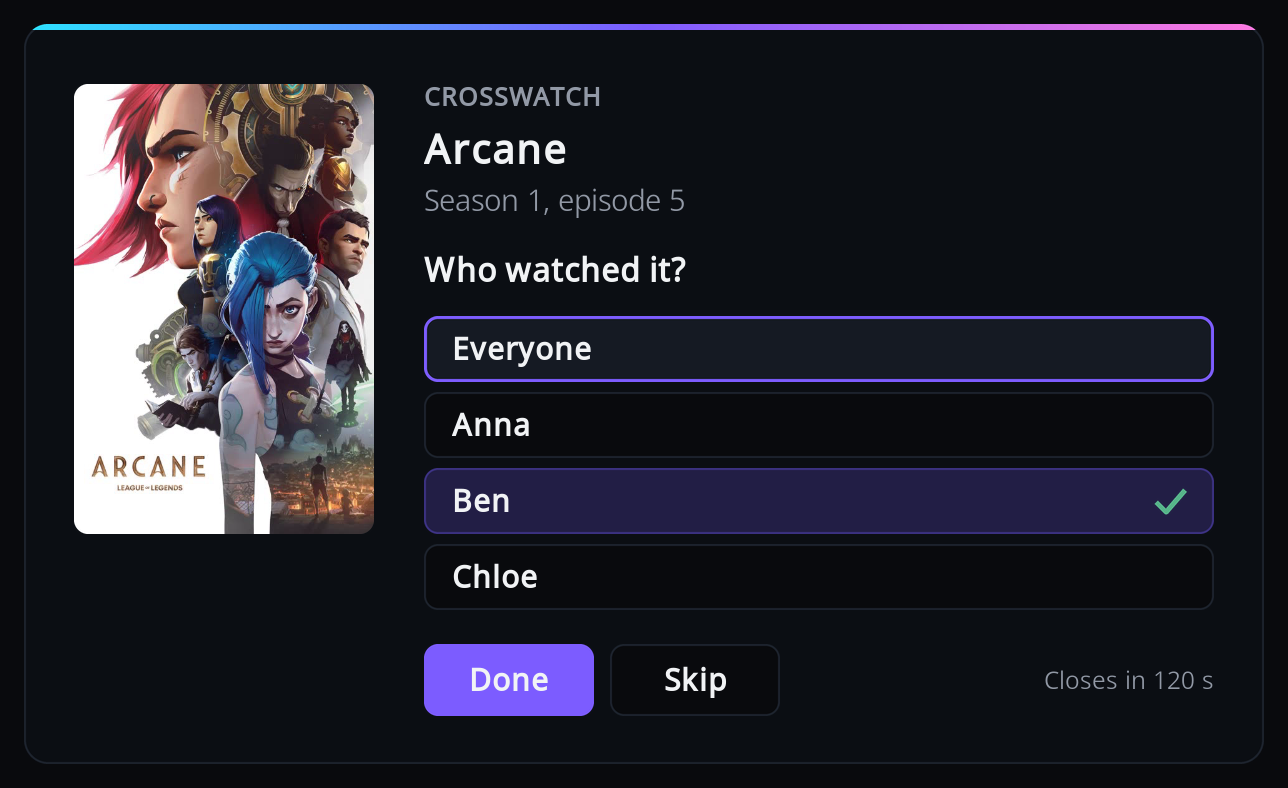
- Press OK on each person who watched; you can tick several. "Everyone" ticks them all (or clears them all when all are ticked).
- Press Done to send the watch with the people you ticked.
- Skip, Back, or Done with nobody ticked sends it with no viewer. Nothing is remembered, so you are asked again next time.
The window closes by itself after two minutes, or when playback starts again, as if you had pressed Skip. The stop is sent to CrossWatch once the question is answered or closes.
For a show, the answer is remembered and used for its later episodes, from the moment they start, so you are asked once per show. To see, change or forget these answers, use Remembered answers. For a film nothing is remembered.
The question is not asked:
- with fewer than two viewers.
- for a film, when "Ask who watched a film" is off.
- when playback stopped in the first three minutes of the item (Kodi's "ignore at start" point, 180 seconds unless changed in Kodi's advanced settings). What counts is the position where it stopped, not how long you watched.
- when the next item starts straight away (binge watching or autoplay). The one that ended is sent with no viewer.
- while another dialog is open, or while Kodi is shutting down.
If rating is switched on, the rating question follows this one.
One person in the household
Add yourself as the only viewer, with no playlists or profiles. With exactly one viewer, everything is credited to that viewer and no question is ever asked. The name must match the username in your CrossWatch route's whitelist.
Having no viewers at all also works, if your CrossWatch route has an empty username whitelist and no user profile: every playback is then sent with no viewer.